Overview
Global Theme Settings control the look, feel, and behavior of your entire store. Unlike section-specific options, these settings apply across every page, giving your brand a consistent, professional identity. Set these first; they save time and keep every page consistent.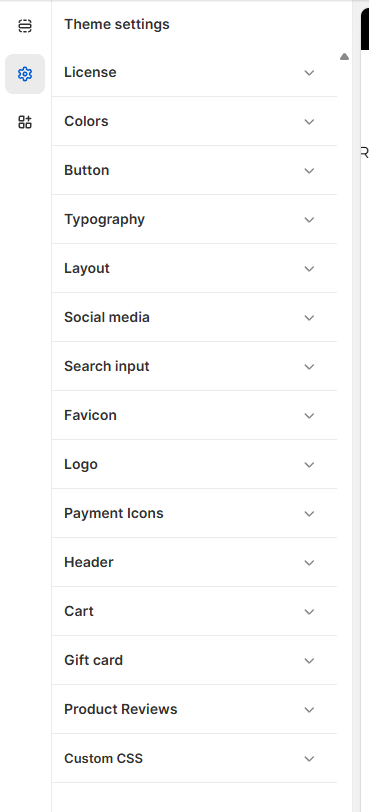
Below is a breakdown of the main categories you’ll work with inside Surge.
Accessing The Global Theme Settings
1. Open your theme editor
2. Click on the “Gear Icon” on your sidebar.
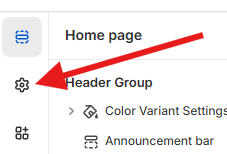 3. This will open up access to all your Global Theme Settings for your theme.
Styling The Section
Global Theme Settings define the overall look, feel, and functionality of your Shopify store, ensuring visual and brand consistency across all pages.
From typography and color palettes to buttons and spacing, these settings act as your store’s design foundation. Setting them up first helps maintain a cohesive brand identity, streamline customization, and save time when building or updating pages.
Click the links below to view each of the Global Theme Settings sections' guides.
License Key
Logo
Cart
Gift Card
Product Reviews (Auto-Sync Reviews)
Need Help?
If you experience any issues activating your license, we're here to help.
Please click “Create a support ticket” in your portal or email us directly at [email protected] and our team will assist you as quickly as possible.
Was this article helpful?
That’s Great!
Thank you for your feedback
Sorry! We couldn't be helpful
Thank you for your feedback
Feedback sent
We appreciate your effort and will try to fix the article