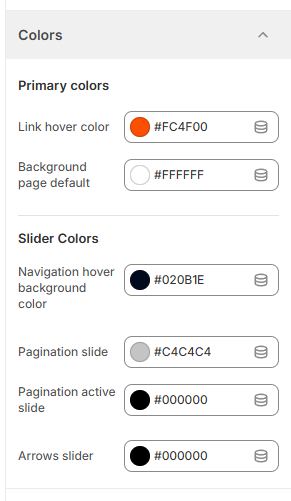
Global Theme Settings - Colors

Created by Albert from ConversionWise Support, Modified on Fri, 20 Mar at 7:24 PM by Albert from ConversionWise Support

The Colors section allows you to control the overall color scheme of your Surge theme. From primary elements like background and links to slider navigation styles, these settings help you maintain a consistent and branded look across your store.


Quick Setup Guide

  1. Go to your Shopify Admin

  2. Navigate to Online Store → Themes

  3. Click Customize on your Surge theme

  4. Open Theme Settings (gear icon)

  5. Select Colors


Primary Colors


    6. Set your Link Hover Color
7. Choose your Background Page Default color


Slider Colors
8. Adjust Navigation Hover Background Color
9. Set Pagination Slide color
  
10. Set Pagination Active Slide color
11. Customize Arrows Slider color

Click Save


These settings will instantly update the visual appearance of your store to match your brand.

Was this article helpful?

That’s Great!

Thank you for your feedback

Sorry! We couldn't be helpful

Thank you for your feedback

Let us know how can we improve this article!

Select at least one of the reasons
CAPTCHA verification is required.

Feedback sent

We appreciate your effort and will try to fix the article