The Buttons section in the Surge theme gives you full control over how buttons look and feel across your entire store. Since buttons are key conversion elements (like Add to Cart, Buy Now, and call-to-action links), having a clear, consistent, and on-brand design can significantly improve user experience and engagement.
With these settings, you can fine-tune the button’s color, shape, and border styling to match your brand identity—whether you prefer sharp, minimal buttons or softer, rounded styles.
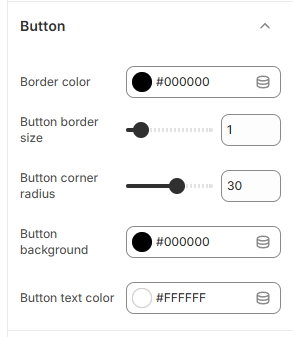
Quick Setup Guide
Go to your Shopify Admin
Navigate to Online Store → Themes
Click Edit Theme on your Surge theme
Open Theme Settings (gear icon)
Select Button
Button Customization Options
Border Color
Sets the outline color of your buttons
Best used to complement or contrast your background and button fill
Button Border Size
Controls the thickness of the button border
Use a smaller value for a subtle look or increase it for more emphasis
Button Corner Radius
Adjusts how rounded the button corners are
Lower values create sharp edges, while higher values create pill-shaped buttons
Button Background
Defines the main fill color of the button
This should align with your brand’s primary or accent color for strong visibility
Button Text Color
Sets the color of the text inside the button
Make sure there is enough contrast with the background for readability
Final Step
Click Save to apply your changes
Once configured, these styles will automatically apply to buttons throughout your store, helping you maintain a cohesive design and create more visually effective calls to action.
Was this article helpful?
That’s Great!
Thank you for your feedback
Sorry! We couldn't be helpful
Thank you for your feedback
Feedback sent
We appreciate your effort and will try to fix the article