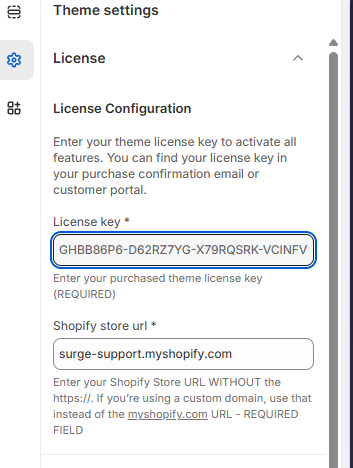
The License Key section in the Surge theme settings is where you activate your theme to unlock all features. This ensures your store is properly connected to your purchase and receives full functionality and updates.
Quick Setup Guide
Go to your Shopify Admin
Navigate to Online Store → Themes
Click Edit Theme on your Surge theme
Open Theme Settings (gear icon)
Select License
Enter your License Key (from your purchase email or customer portal)
Confirm your Shopify Store URL is correct
Click Save
Click HERE for the complete guide on how to activate your Surge theme using your license key.
Once completed, your theme will be fully activated and ready to use.
Was this article helpful?
That’s Great!
Thank you for your feedback
Sorry! We couldn't be helpful
Thank you for your feedback
Feedback sent
We appreciate your effort and will try to fix the article