Overview
The market-specific announcement bar feature allows you to customize promotional messages tailored to different regions (such as setting specific currency thresholds or localized text like "Free shipping on orders over £50") directly in the Surge theme editor.
Each configured market maintains its own independent text message, while any market without a custom entry automatically falls back to your store's default announcement.
Step-by-Step Guide
How to Configure Market-Specific Announcement Text
From your Shopify Admin, go to Online Store > Themes.
Click Customize next to your active Surge theme.
At the top center of the theme editor toolbar, click the market dropdown (which defaults to Store default) and select the specific target market you want to configure (for example, United Kingdom).
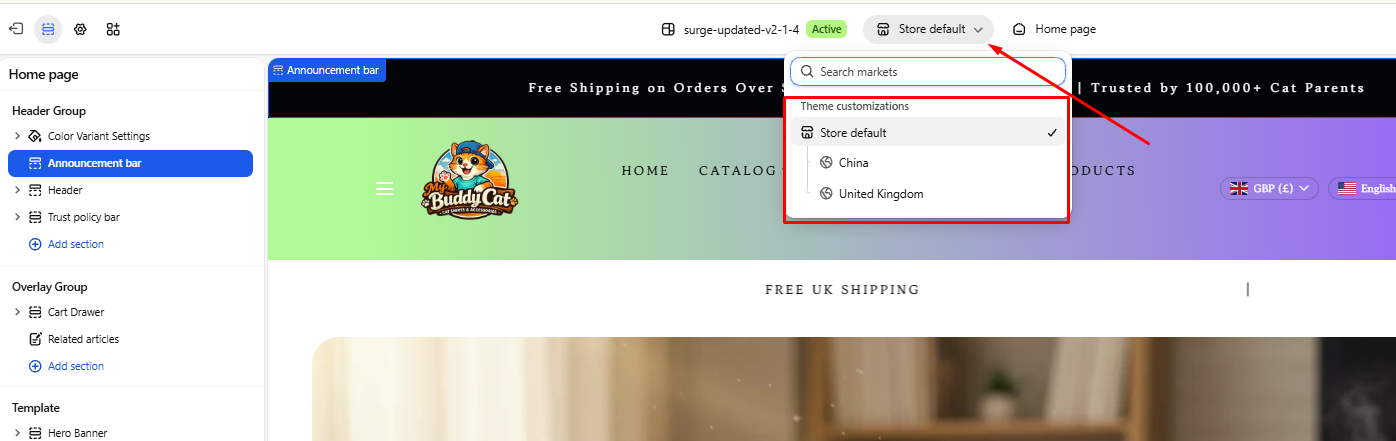
In the left sidebar under the Header Group, click on the Announcement bar section.
Update the announcement bar text to reflect the region's currency and promotional threshold (for example, type “Free shipping on orders over £50”).
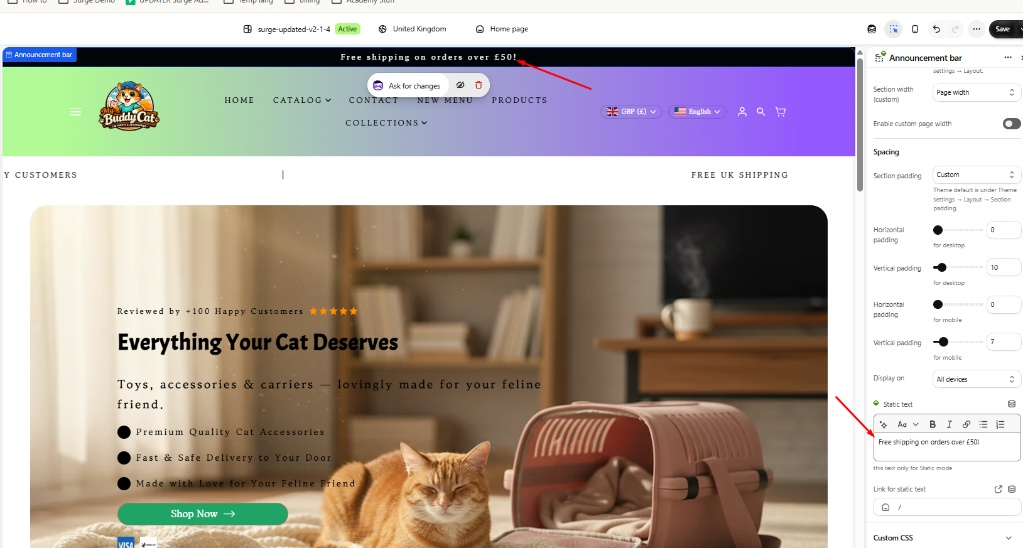
Click Save in the top-right corner.
Switch back to the market dropdown at the top, select your next target market (for example, United States or China), enter its specific localized message, and click Save.
Repeat this process for any additional markets you wish to customize.
Verification: When switching between different markets using the top dropdown menu in the theme editor, the announcement bar text updates instantly to display the exact customized message assigned to that specific region.
? Pro Tip:Because the announcement bar text is configured independently per market, ensure you manually type the correct local currency symbol and amount directly into the message text box for each region (e.g., £50 for the UK, $75 for the US, ₱1,500 for the Philippines). Customers browsing your store will automatically see the exact announcement corresponding to their active geographic market.
Conclusion
Setting up region-specific announcements ensures your international customers receive relevant promotional messaging and localized thresholds, boosting engagement and conversion rates globally.
If you have any further questions or need assistance configuring your Surge theme markets, please submit a ticket to [email protected] and our team will be happy to help!
Was this article helpful?
That’s Great!
Thank you for your feedback
Sorry! We couldn't be helpful
Thank you for your feedback
Feedback sent
We appreciate your effort and will try to fix the article