Overview
The Locale-Aware Title Text Capitalization Control helps ensure that title text is displayed using capitalization rules that are appropriate for the language and region selected in your store.
Different languages have different grammatical conventions for capitalization. While English often uses title case for headings, other languages may require sentence case or follow unique capitalization rules. This feature automatically adapts title formatting to better align with local language standards, helping create a more natural and professional shopping experience for international customers.
Benefits
- Ensures title capitalization follows language-specific conventions.
- Improves localization for international storefronts.
- Creates a more professional and natural reading experience for customers.
- Reduces the need for manual title formatting adjustments.
- Supports languages with unique capitalization rules, such as German and other non-English locales.
How to Enable Locale-Aware Typography
To enable locale-aware title capitalization:
- From your Shopify admin, navigate to Online Store.
- Locate your Surge theme and click Edit Theme.
- Click the gear icon in the top-left corner to open the Global Theme Settings.
- Navigate to Typography.
- Enable the Locale-Aware Typography setting.
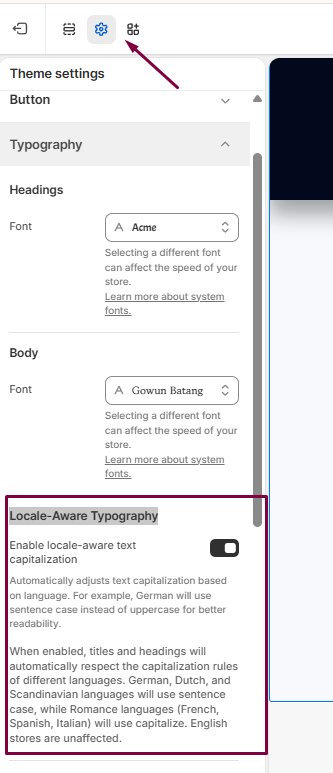
- Click Save to apply your changes.
How It Works
When enabled, Surge automatically applies capitalization rules that are appropriate for the active store language and locale.
This helps ensure that headings, titles, and other typography elements are displayed in a way that feels natural to customers in different regions, improving both readability and localization quality.
Need Help?
If you have any questions or need assistance configuring Locale-Aware Typography, we're happy to help.
Click Submit a Support Ticket within our Help Center, or email us at [email protected], and our team will get back to you as soon as possible.
Was this article helpful?
That’s Great!
Thank you for your feedback
Sorry! We couldn't be helpful
Thank you for your feedback
Feedback sent
We appreciate your effort and will try to fix the article