Overview
The Advertorial Final CTA section is designed to close out an advertorial-style landing page with a strong final pitch. It pairs persuasive copy (title, description, and a benefit-driven points list) with a large product lifestyle image, a clear call-to-action button, and a review card for social proof, giving shoppers one last reason to click "Add to Cart" before they leave the page.
This section is built from customizable blocks (Title, Description, Points list, Button, Review card) and a set of section-level settings that control layout, images, and styling.

Step-by-Step Guide
- Add the section to your templateIn the Theme Editor, select the template you want to edit (e.g., your Home page or a Landing Page template), clickAdd section, and chooseAdvertorial Final CTA
- Add and arrange your content blocksInside the section, clickAdd blockto include any of the following, then drag to reorder them:
- Title– your main headline (e.g., "For cats with big personalities: Give them more to love.")
- Description– supporting copy that introduces the product
- Points list– a numbered list of key benefits
- Button– your primary call-to-action (e.g., "Shop Buddycat")
- Review card– a customer quote with name, verified buyer badge, and star rating
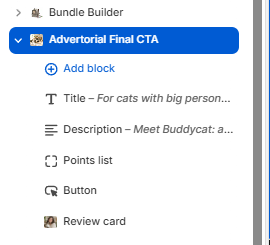
The blocks list for the Advertorial Final CTA section in the Theme Editor sidebar. - Upload your imagesUnderGeneral settings, upload aRight image(recommended 1200 x 1200px) for desktop and aRight image (mobile)(recommended 750 x 1000px) for smaller screens. These typically show the product in a lifestyle setting.
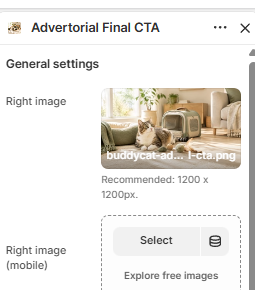
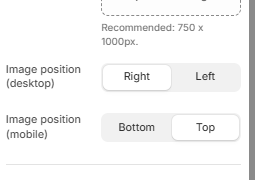
- Set the image positionChoose whether the image appears on theRightorLeftfor desktop, andBottomorTopfor mobile, using the Image position toggles.
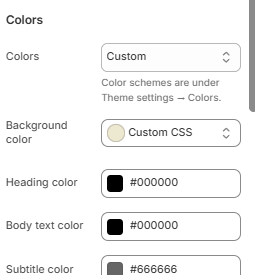
- Customize the colorsUnderColors, set theHeading color,Body text color,Subtitle color,Star color, andBorder colorto match your brand. You can also set a customBackground coloror use Custom CSS. Note that overall color schemes are managed underTheme settings → Colors.
- Adjust layout and spacing
- SetFont family, or leave it asDefault by theme.
- ToggleEnable custom page widthif you want this section to break from your theme's default width, then set theCustom page widthandColumn gapusing the sliders.
- Section paddingfollows your theme default unless changed — this is managed underTheme settings → Layout → Section padding.
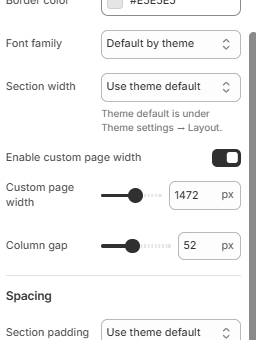
Layout and spacing controls, including custom page width and column gap. - Preview and publishUse the preview pane to check how the section looks on both desktop and mobile before saving and publishing your changes.
Pro Tip
Closing
The Advertorial Final CTA section is one of the most effective tools for turning an engaged reader into a buyer — use it to summarize your product's value, back it up with social proof, and make the next step obvious.
If you run into any issues setting up this section or have further questions, our support team is happy to help, just reach out to [email protected] and we'll get you sorted.
Was this article helpful?
That’s Great!
Thank you for your feedback
Sorry! We couldn't be helpful
Thank you for your feedback
Feedback sent
We appreciate your effort and will try to fix the article