Overview
The Hero Banner is one of the most important sections in the Surge Theme. It’s the first thing visitors see when they land on your store, making it your primary opportunity to grab attention, communicate your core value proposition, and drive immediate action.
As shown in the editor flow, the Hero Banner can be added, duplicated, and fully customized, including headlines, subtext, visuals, and call-to-action buttons, all directly within the Theme Editor.
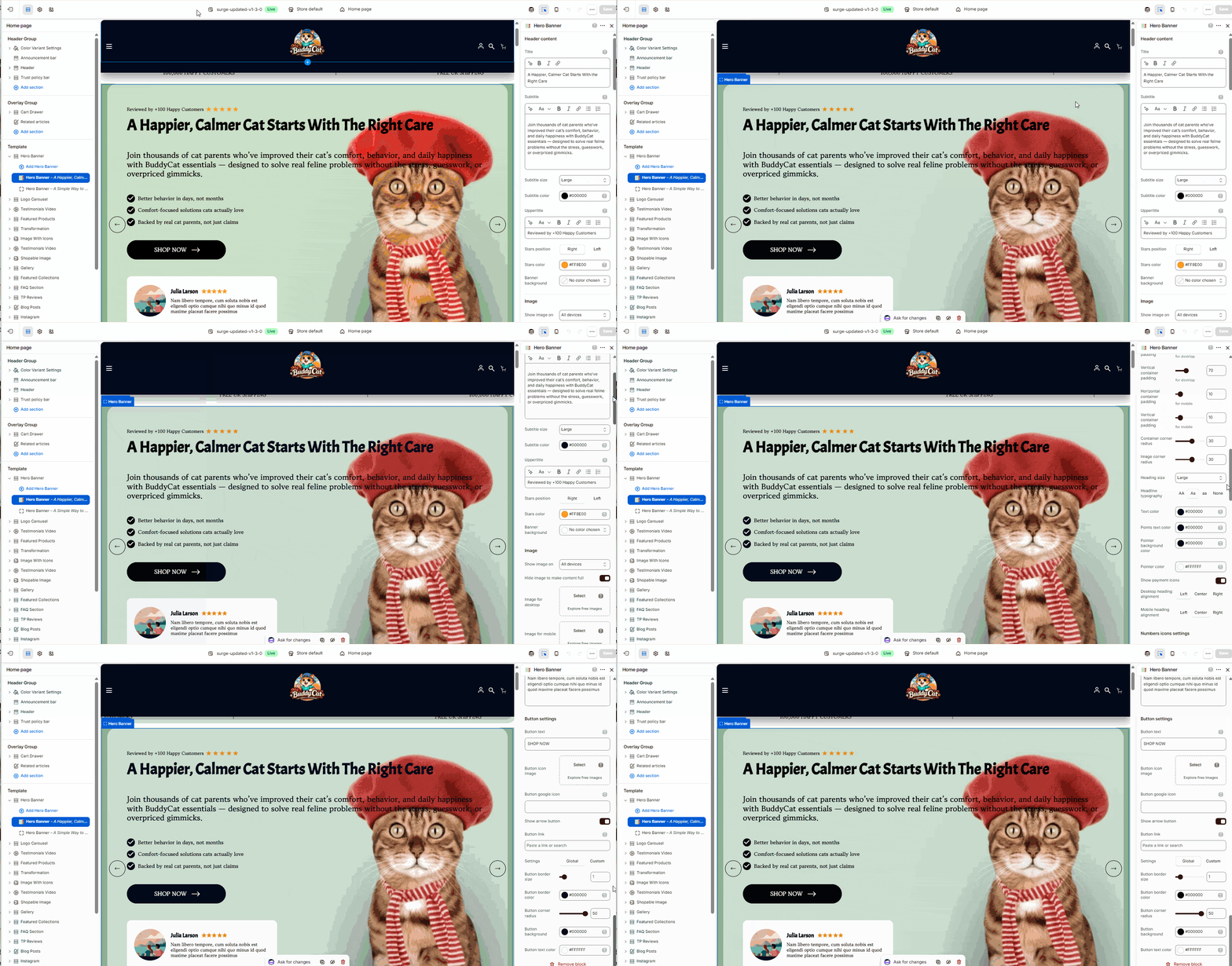
Step-by-Step Guide
1. Open the Theme Editor
- In your Shopify admin, go to Online Store → Themes
- Click Edit Theme on your active Surge theme
2. Navigate to the Page
- Use the top dropdown (e.g., Home page) to select where your Hero Banner will appear
3. Add or Manage Hero Banners
- In the left sidebar under Template, locate Hero Banner
- Click Add Hero Banner to create a new one
- You can also duplicate existing banners to create multiple slides
4. Edit Hero Banner Content
Click on a Hero Banner block to customize:
- Title (Headline)
- Your main hook (e.g., value proposition or big promise)
- Subtitle (Supporting Text)
- Expand on your offer and explain the benefit
- Uppertitle (Optional)
- Add trust signals (e.g., “Reviewed by 100+ Happy Customers”)
- Bullet Points
- Highlight key benefits or features
- CTA Button
- Customize text (e.g., “Shop Now”) and link
5. Customize Visuals
- Upload or change the Hero Image
- Ensure the image aligns with your product and messaging
- Optimize for both desktop and mobile views
6. Adjust Styling Options
- Text Size & Colors – Match your brand identity
- Star Ratings – Enable and position (left or right)
- Alignment & Layout – Adjust spacing and positioning for clarity
- Slider Controls – If using multiple banners, configure navigation arrows or transitions
7. Arrange the Section
- Drag and reposition the Hero Banner within the page layout
- Typically placed at the very top of the homepage
8. Save Your Changes
- Click Save in the top-right corner
Tips for Best Results
- Focus on one clear message, avoid clutter
- Use benefit-driven headlines, not just product names
- Pair your message with a high-quality, relevant image
- Keep CTAs clear and action-oriented
- Test multiple banners to see what converts best
Need Help?
If you need help setting up or optimizing your Hero Banner, feel free to reach out. Click Submit a Support Ticket or email [email protected]—we’re here to help!
Was this article helpful?
That’s Great!
Thank you for your feedback
Sorry! We couldn't be helpful
Thank you for your feedback
Feedback sent
We appreciate your effort and will try to fix the article