Important: The Surge Theme Updater is only compatible with Surge v1.0.1 and above. If you are using v1.0.0, please update using Method 1 (manual upload) here
Overview
The Surge Theme Updater allows you to update to the latest version of the Surge theme while preserving your existing theme settings and layouts.
Instead of reconfiguring everything manually, the updater merges your current Theme Editor settings into the new version, helping your store maintain its design and structure.
What the Updater Preserves
Theme settings (colors, typography, spacing, etc.)
Section configurations (homepage, collection, product layouts)
Template assignments (custom templates for products, collections, pages)
Translations and custom text
Step-by-Step Guide
Step 1: Export Your Current Theme
Log in to your Shopify admin
Go to Online Store → Themes
Locate your current Surge theme
Click the three dots (⋯) → Download theme file
Download the ZIP file from the Shopify email
Important: Do not unzip the file.
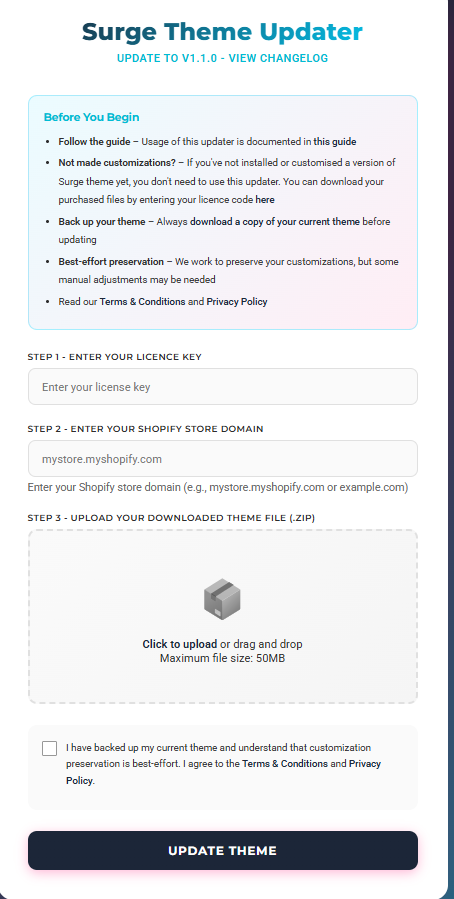
Step 2: Upload to the Surge Theme Updater
Visit the Surge Theme Updater (https://update.surgetheme.com/
Enter your license key
Enter your store domain
Upload the theme ZIP file
Click Update Theme
Step 3: Processing
The updater will:
Validate your license
Analyze your theme settings
Merge your configurations into the latest version
Generate a new ZIP file
Processing usually takes 5 seconds to 2 minutes.
Step 4: Download the Updated Theme
Click Download
Save the new ZIP file to your computer
Download links expire after 15 minutes. If needed, rerun the process.
Step 5: Upload the Updated Theme to Shopify
Go to Online Store → Themes
Click Add theme → Upload ZIP file
Select the updated ZIP file
Wait for the upload to complete
Step 6: Preview and Publish
Click Customize on the newly uploaded theme
Review your homepage, product pages, collections, and cart
Click Publish once confirmed
We recommend previewing thoroughly before going live.
Limitations
Maximum file size: 50 MB
Only Theme Editor (JSON) settings are preserved
Custom code and third-party app edits are not merged
Requires a valid license that matches your store domain
Limited to 5 updates per hour per store
The Surge Theme Updater is provided as a beta tool. Always review your updated theme before publishing.
Need Help?
If you need assistance, click Create a support ticket or email us at [email protected].
We’re happy to help.
Was this article helpful?
That’s Great!
Thank you for your feedback
Sorry! We couldn't be helpful
Thank you for your feedback
Feedback sent
We appreciate your effort and will try to fix the article