If you're having trouble verifying your licence in the theme editor, follow the guide below.
When entering your licence details, the system asks for your license key and store URL. It effectively "binds" that license strictly to the domain you enter.
Here are the most important things to remember to ensure it works the first time:
- Ensure you use your store's PRIMARY domain
- Custom Domains: If you are using a custom domain (e.g., yourstore.com), please enter that.
- MyShopify Domains: If you aren't using a custom domain yet, use your myshopify.com address.
- No Prefixes: Please do not include https:// in front of the URL. Just enter the raw domain (e.g., surgetheme.com). If the raw domain doesn't work, attempt it with www.
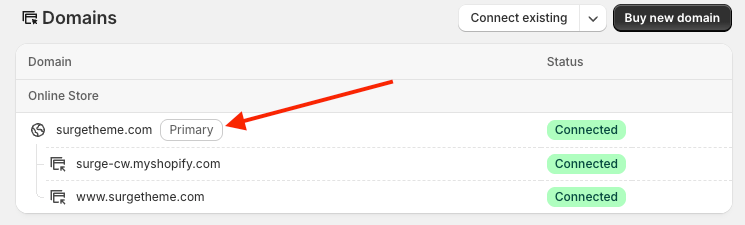
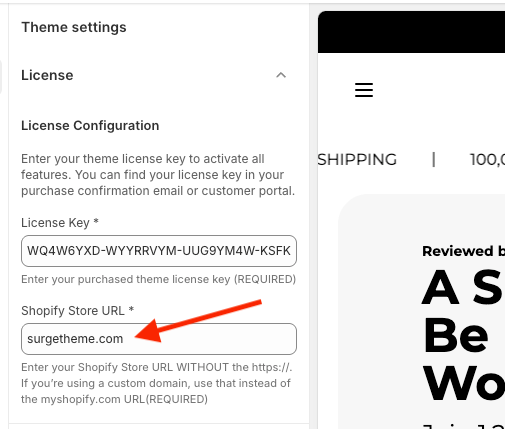
Follow our licence verification guide here to complete the process.
Made a typo or need to switch domains? If you accidentally spell your domain wrong or enter the wrong URL type, the system might still try to validate and bind the license to that incorrect address.
To fix this, you don't need to wait for support!
- Visit the portal here: https://base.surgetheme.com
- Enter your license key to log in.
- Scroll down to the "Change Domain" section.
- Enter the correct URL and click "Change Domain."
- Go back to your Shopify Theme Editor and re-enter the correct details to unlock the theme.
Below is video guide that walks you through this entire process visually:
Still having trouble? If the steps above don't work, we are happy to investigate for you. Please submit a support ticket and include your Shopify Store URL and your Collaborator Code so we can access the theme settings.
Was this article helpful?
That’s Great!
Thank you for your feedback
Sorry! We couldn't be helpful
Thank you for your feedback
Feedback sent
We appreciate your effort and will try to fix the article