Yes, you can easily reset your Surge license and move it to a new store or domain at any time.
If you’ve changed domains, duplicated a store, or want to use your license on a different Shopify site, simply follow the steps below to unlink it from the old store and activate it on the new one.
Step 1 — Reset your license domain
Enter your License Key
In the Enter Your New Domain field, type your new store URL
Example:
your-store.myshopify.comor your custom domain
Click Change Domain
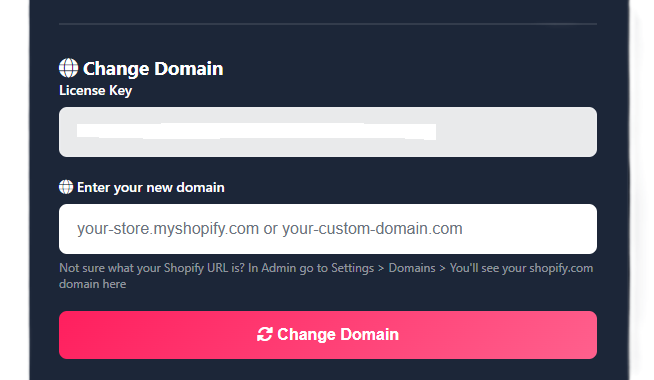
This will:
Unlink the license from the previous site
Assign it to your new domain
Step 2 — Activate the license in your new store
After resetting the domain:
In Shopify, go to Online Store → Themes
Click Customize on your Surge theme
Open Theme Settings (gear icon)
Go to License
Paste your License Key
Copy the Store URL that auto-populates
Paste it into the Store URL field if prompted
Save
Your license will now be successfully activated on the new site.
For issues with license verifications, please see this guide: Licence Verification Troubleshooting
FAQs
Will this remove the license from my old store?
Yes. Changing the domain automatically disconnects the license from the previous store.
Can I switch domains again later?
Yes, you can repeat this process anytime if you need to move your license again.
What URL should I enter?
Use your store’s primary domain:
your-store.myshopify.comorYour connected custom domain
Was this article helpful?
That’s Great!
Thank you for your feedback
Sorry! We couldn't be helpful
Thank you for your feedback
Feedback sent
We appreciate your effort and will try to fix the article