The Custom CSS section is a powerful tool for advanced users to fine-tune the Surge theme beyond the standard settings. It allows you to add specific styling rules that apply across your entire online store.
This section provides a direct code editor to inject Cascading Style Sheets (CSS). Use this to override theme defaults, adjust specific element spacing, or add unique design flourishes like custom borders and shadows.
Caution: Adding incorrect CSS can affect the appearance and functionality of your site. If you are not familiar with coding, we recommend reaching out to a developer or testing small changes first.
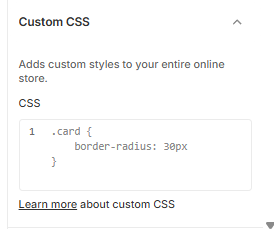
How to Add Custom Styles
Follow these steps to apply your own CSS:
Open the Theme Editor: From your Shopify Admin, go to Online Store > Themes > Edit Theme.
Open Theme Settings: Click the Gear icon (⚙️) in the left-hand sidebar.
Select Custom CSS: Scroll to the bottom of the list and click the Custom CSS accordion.
Enter Your Code: Type or paste your CSS rules directly into the code box.
Example: Entering
.card { border-radius: 30px; }will apply rounded corners to all product cards on your site.
Preview: Your changes will appear instantly in the editor preview window.
Save: Once you are satisfied with the results, click Save in the top right corner.
Was this article helpful?
That’s Great!
Thank you for your feedback
Sorry! We couldn't be helpful
Thank you for your feedback
Feedback sent
We appreciate your effort and will try to fix the article